

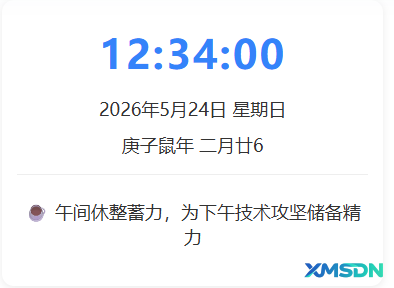
✅ 时间 H1 最大
✅ 年月日 / 农历 H2
✅ 问候语 H3(更小更协调)
✅ 字多自动换行显示,不溢出
✅ 全部居中、白色背景
<style>
.time-show-wrap {
    background: #ffffff;
    padding: 30px 20px;
    border-radius: 12px;
    text-align: center;
    margin: 0 auto;
    box-shadow: 0 2px 8px rgba(0,0,0,0.08);
}
/* 时间 H1 最大 */
.time-show-clock h1 {
    font-size: 4.5rem !important;
    font-weight: bold !important;
    color: #3483fa !important;
    margin: 0 0 20px !important;
    letter-spacing: 2px !important;
    text-align: center !important;
}
/* 年月日 农历 H2 中等 */
.time-show-date h2,
.time-show-lunar h2 {
    font-size: 20px !important;
    font-weight: normal !important;
    color: #333 !important;
    margin: 8px 0 !important;
    text-align: center !important;
}
/* 问候语 H3 最小 + 自动换行 */
.time-show-tip h3 {
    font-size: 16px !important;
    font-weight: normal !important;
    color: #555 !important;
    margin: 10px 0 !important;
    text-align: center !important;
    line-height: 1.5 !important;
    white-space: pre-line !important;
}
.time-show-tip {
    padding-top: 15px;
    border-top: 1px solid #eee;
    margin-top: 10px;
}
</style>

<div class="time-show-wrap">
    <div class="time-show-clock"><h1 id="timeShowClock">00:00:00</h1></div>
    <div class="time-show-date"><h2 id="timeShowDate">0000年00月00日 星期X</h2></div>
    <div class="time-show-lunar"><h2 id="timeShowLunar">农历 XXXX年 初X</h2></div>
    <div class="time-show-tip"><h3 id="timeShowTip"></h3></div>
</div>

<script>
var lunarInfo = [
    0x04bd8,0x04ae0,0x0a570,0x054d5,0x0d260,0x0d950,0x16554,0x056a0,0x09ad0,0x055d2,
    0x04ae0,0x0a5b6,0x0a4c0,0x0d250,0x1d255,0x0b540,0x0d6a0,0x0ada2,0x095b0,0x14977,
    0x04970,0x0a4b0,0x0b4b5,0x06a50,0x06d40,0x1ab54,0x02b60,0x09570,0x052f2,0x04970,
    0x06566,0x0d4a0,0x0ea50,0x06e95,0x05ad0,0x02b60,0x186e3,0x092e0,0x1c8d7,0x0c950,
    0x0d4a0,0x1d8a6,0x0b550,0x056a0,0x1a5b4,0x025d0,0x092d0,0x0d2b2,0x0a950,0x0b557,
    0x06ca0,0x0b550,0x15355,0x04da0,0x0a5d0,0x14573,0x052d0,0x0a9a8,0x0e950,0x06aa0,
    0x0aea6,0x0ab50,0x04b60,0x0aae4,0x0a570,0x05260,0x0f263,0x0d950,0x05b57,0x056a0,
    0x096d0,0x04dd5,0x04ad0,0x0a4d0,0x0d4d4,0x0d250,0x0d558,0x0b540,0x0b5a0,0x195a6,
    0x095b0,0x049b0,0x0a974,0x0a4b0,0x0b27a,0x06a50,0x06d40,0x0af46,0x0ab60,0x09570,
    0x04af5,0x04ad0,0x0a6b0,0x13376,0x052b0,0x0a930,0x07954,0x06aa0,0x0ad50,0x05b52,
    0x04b60,0x0a6e6,0x0a4e0,0x0d260,0x0ea65,0x0d530,0x05aa0,0x076a3,0x096d0,0x04bd7,
    0x04ad0,0x0a2d0,0x1d0b6,0x0d150,0x052c0,0x0a4e0,0x0f255,0x052d0,0x0a5a0,0x1a3a6,
    0x06ca0,0x0aae0,0x1a6c4,0x092e0,0x186a6,0x095e0,0x049f5,0x04970,0x0a4b0,0x0b4b5,
    0x06a50,0x06d40,0x0af46,0x0ab60,0x09570,0x04af5,0x04ad0,0x0a6b0,0x13376,0x052b0,0x0a930,
    0x07954,0x06aa0,0x0ad50,0x05b52,0x04b60,0x0a6e6,0x0a4e0,0x0d260,0x0ea65,0x0d530,
    0x05aa0,0x076a3,0x096d0,0x04bd7,0x04ad0,0x0a2d0,0x1d0b6,0x0d150,0x052c0,0x0a4e0,
    0x0f255,0x052d0,0x0a5a0,0x1a3a6,0x06ca0,0x0aae0,0x1a6c4,0x092e0,0x186a6,0x095e0,
    0x049f5,0x04970,0x0a4b0,0x0b4b5,0x06a50,0x06d40
];
var Gan = ["甲","乙","丙","丁","戊","己","庚","辛","壬","癸"];
var Zhi = ["子","丑","寅","卯","辰","巳","午","未","申","酉","戌","亥"];
var Animals = ["牛","虎","兔","龙","蛇","马","羊","猴","鸡","狗","猪","鼠"];
var solarMonth = [31,28,31,30,31,30,31,31,30,31,30,31];
var monthName = ["正","二","三","四","五","六","七","八","九","十","冬","腊"];

function solar2lunar(y, m, d) {
    if (y < 1900 || y > 2100) return null;
    var baseYear = 1900, baseMonth = 1, baseDay = 31;
    var offset = Math.floor((Date.UTC(y,m-1,d) - Date.UTC(baseYear,baseMonth-1,baseDay)) / 86400000);
    var ly = 1900;
    while(ly < 2101 && offset >0){ var dly = lunarInfo[ly-1900] > 0xfff ? 384 : 354; offset -= dly; ly++; }
    if(offset <0){ ly--; offset += lunarInfo[ly-1900] > 0xfff ? 384 : 354; }
    var leap = lunarInfo[ly-1900] & 0xf;
    var isLeap = false, i=1;
    while(i<13 && offset>0){
        var dim = (leap>0 && i==leap && !isLeap) ? getLeapMonthDays(ly) : getMonthDays(ly,i);
        offset -= dim; if(leap>0 && i==leap && !isLeap){ isLeap = true; continue; } isLeap=false; i++;
    }
    if(offset ==0 && leap>0 && i==leap+1){ if(isLeap){isLeap=false;}else{isLeap=true; i--;} }
    if(offset <0){ offset += (leap>0 && i==leap && !isLeap) ? getLeapMonthDays(ly) : getMonthDays(ly,i); i--; }
    return { year:ly, month:i, day:offset+1, isLeap:isLeap };
}
function getMonthDays(y,m){ return (lunarInfo[y-1900] & (0x10000 >> m)) ? 30 : 29; }
function getLeapMonthDays(y){ return lunarInfo[y-1900] & 0x10000 ? 30 : 29; }
function getGanZhiYear(y){ return Gan[(y-4)%10] + Zhi[(y-4)%12]; }
function formatLunarDay(d){
    if(d==10)return'初十'; if(d==20)return'二十'; if(d==30)return'三十';
    return ['初','十','廿','三'][Math.floor(d/10)] + (d%10==0 ? '十' : d%10);
}
function getAnimal(y){ return Animals[(y-4)%12]; }

// 技术问候语 + 自动换行
function getTimeTip(hour) {
    if (hour >= 5 && hour < 8) return "⚙️ 清晨巡检服务,守护站点稳定\n保障用户流畅访问";
    if (hour >= 8 && hour < 12) return "💻 专注代码开发,优化程序性能\n打造优质用户体验";
    if (hour >= 12 && hour < 14) return "☕ 午间休整蓄力,为下午技术攻坚\n储备精力,高效前行";
    if (hour >= 14 && hour < 18) return "🔧 调试优化系统,排查问题隐患\n提升网站运行效率";
    if (hour >= 18 && hour < 21) return "📊 复盘技术工作,沉淀经验\n持续迭代优化项目";
    return "🌙 结束技术工作,及时休息\n保持状态,明日高效前行";
}

function updateTimeShow() {
    var now = new Date();
    let h = now.getHours().toString().padStart(2,'0'),
        m = now.getMinutes().toString().padStart(2,'0'),
        s = now.getSeconds().toString().padStart(2,'0');
    document.getElementById("timeShowClock").innerText = `${h}:${m}:${s}`;

    let y = now.getFullYear(), mon = now.getMonth()+1, d = now.getDate();
    let week = ["星期日","星期一","星期二","星期三","星期四","星期五","星期六"][now.getDay()];
    document.getElementById("timeShowDate").innerText = `${y}年${mon}月${d}日 ${week}`;

    let lunar = solar2lunar(y,mon,d);
    if(lunar){
        let gz = getGanZhiYear(lunar.year), sx = getAnimal(lunar.year);
        let mtext = lunar.isLeap ? '闰'+monthName[lunar.month-1] : monthName[lunar.month-1];
        document.getElementById("timeShowLunar").innerText = `${gz}${sx}年 ${mtext}月${formatLunarDay(lunar.day)}`;
    }
    document.getElementById("timeShowTip").innerText = getTimeTip(h);
}
updateTimeShow();
setInterval(updateTimeShow,1000);
</script>
问候语是按 “小时区间” 变的,不是几秒几分钟变一次;页面会每秒检查时间,一跨到新小时区间就立刻换问候语。
// 0–5 点
return "🌙 结束技术工作,及时休息\n保持状态,明日高效前行";

// 5–8 点
return "⚙️ 清晨巡检服务,守护站点稳定\n保障用户流畅访问";

// 8–12 点
return "💻 专注代码开发,优化程序性能\n打造优质用户体验";

// 12–14 点
return "☕ 午间休整蓄力,为下午技术攻坚\n储备精力,高效前行";

// 14–18 点
return "🔧 调试优化系统,排查问题隐患\n提升网站运行效率";

// 18–24 点
return "📊 复盘技术工作,沉淀经验\n持续迭代优化项目";
每个区间固定 2~4 小时
一天总共只变 6 次(0 点、5 点、8 点、12 点、14 点、18 点)
二、多久检查一次?
代码最后一行:
setInterval(updateTimeShow, 1000);
1000 毫秒 = 1 秒
每秒都会执行
updateTimeShow,重新取当前小时、重新判断问候语但只要小时没跨区间,问候语内容不变,只是 “刷新一下”
三、举个例子
现在 10:25 → 属于 8–12 点 → 显示 “专注代码开发…”
一直到 11:59:59 还是这句
12:00:00 一到,立刻换成 “午间休整蓄力…”